

Dell XPS Guide: The Professional Standard for High-Performance Computing
by Barkay International on Apr 15, 2026

A laptop that throttles its speed during a 4K render is a liability, not a professional tool. Many users find that sleek designs often sacrifice cooling, leading to performance drops just when a deadline hits. If you've ever felt battery life anxiety during a 10-hour workday, you know that portability means nothing without endurance. The dell xps series has long been the benchmark for high-capacity composite laptops, but the 2024 shift to 13, 14, and 16-inch models has left some buyers confused about which hardware actually fits their workflow.
You deserve a machine that handles heavy data processing and creative suites without the heat issues found in generic builds. This guide clears up the numbering confusion and shows you why these machines remain the premier choice for modern professionals. You'll learn how to select the right model based on your specific power requirements. We also verify our sourcing quality; Barkay International buys these units directly from the USA to ensure you receive authentic, high-performance hardware nationwide. Let's look at the hierarchy of the current XPS lineup so you can shop with total confidence.
Key Takeaways
- Understand why the InfinityEdge design and CNC-machined aluminum make this series the standard for professional durability.
- Learn why the dell xps 15 9530 with 32GB of RAM serves as the modern performance baseline for Windows 11 Pro.
- Compare the portability of the XPS 13 against the power of the XPS 14 and 16 to select your ideal workstation.
- Discover how dual-fan thermal systems and aerospace-inspired carbon fiber maintain high speeds in thin laptop frames.
- Explore the advantages of sourcing authentic Dell hardware directly from the USA to guarantee quality and reliability.
The Dell XPS Legacy: Why It Remains the Professional Windows Standard
The Dell XPS line represents the peak of Dell's consumer engineering. Standing for Extreme Performance System, these devices serve as the flagship brand for users who need power without the bulk of a traditional gaming rig. The Dell XPS Legacy began as a high-end gaming line but transitioned into a premium productivity tool for the modern era. A major turning point occurred in 2015 with the introduction of the InfinityEdge display. This innovation reduced bezels to less than 4mm; it allowed a 15-inch screen to fit into a chassis typically reserved for 14-inch laptops.
Creative professionals and executives choose the dell xps because it balances aesthetics with raw performance. While the Inspiron line targets general home users, the XPS focuses on high-fidelity builds and color-accurate displays. The 2026 lineup continues this trend by packing workstation-class components into CNC-machined aluminum frames. These machines aren't just tools; they're high-capacity composite laptops designed for durability in high-pressure environments. We source these units directly from the USA to ensure our clients in Nairobi receive the highest hardware standards available.
XPS vs. Latitude: Choosing the Right Business Tool
Choosing between these two depends on your specific role. Latitude laptops focus on enterprise management and port variety. The dell xps prioritizes visual impact and premium materials. Executives often prefer the XPS for client-facing meetings where the sleek profile makes a professional statement. From a technical standpoint, the superior build quality reduces the long-term total cost of ownership. The use of carbon fiber palm rests and Gorilla Glass screens ensures the hardware survives years of intensive daily use without degrading.
The Evolution of the 'Plus' Design Language
Modern XPS models now adopt the 'Plus' design language. This includes a seamless glass haptic touchpad that provides tactile feedback without a physical moving part. It creates a smooth surface that resists wear and simplifies the cleaning process. The capacitive touch function row replaces traditional keys with a backlit interface. This shift allows for a minimalist look that removes visual distractions. Professionals find this layout efficient for shortcuts during video editing or software development. The design is clean, functional, and built for high-output environments where focus is the priority.
Engineering Excellence: Materials, Display, and the 'InfinityEdge' Experience
The dell xps 15 9530 uses a chassis carved from a single block of CNC-machined aluminum. This construction provides a rigid frame that resists flexing during international travel. Dell pairs this metal exterior with aerospace-inspired carbon fiber on the palm rest. This specific material keeps the device light at approximately 4.21 lbs while maintaining high structural integrity. Inside the ultra-thin 18mm chassis, Dell integrates dual fans and hidden exhaust vents. These components work together to dissipate heat from the i7-13620H processor without requiring bulky grills. The 16:10 aspect ratio offers 5% more vertical screen space than traditional 16:9 displays. This extra room allows developers to view more lines of code and editors to manage longer document layouts without constant scrolling. For professionals moving between Nairobi and the United States, the build quality meets the rigorous standards required for constant remote work.
OLED vs. FHD+: Selecting the Right Display Panel
Users can choose between a 3.5K OLED touch screen or a standard FHD+ non-touch panel. The OLED option provides 100% DCI-P3 color gamut coverage. This makes it a preferred tool for the 90% of visual designers who require absolute color precision. It features Eyesafe technology to reduce harmful blue light emissions during 10-hour work sessions. If your priority is maximum mobility, the FHD+ panel is the better choice. It can extend battery life by up to 4 hours compared to the high-resolution OLED version. This display philosophy mirrors the narrow-bezel approach found in this Dell XPS 13 review, which emphasizes screen-to-body immersion.
Audio and Connectivity in a Minimalist Chassis
The dell xps features a quad-speaker system tuned with Waves Nx 3D audio. Two primary woofers and two tweeters deliver studio-quality sound for media production. Connectivity focuses on a pure Thunderbolt 4 environment. These ports provide 40Gbps data transfer speeds for high-speed peripheral docking. Dell also includes integrated AI noise reduction for the microphones. This technology filters out ambient background noise during professional video conferencing. This high-capacity composite laptop ensures you stay connected to global markets without the need for heavy adapters. If you want to upgrade your professional toolkit, you can shop our latest inventory of performance-ready machines.
Performance Benchmarks: i7-13620H vs. AI-Ready Processors
The Dell XPS 15 9530 utilizes the Intel Core i7-13620H to provide a balance of high-end speed and thermal efficiency. This processor features 10 cores, consisting of 6 Performance-cores and 4 Efficient-cores, with a maximum turbo frequency of 4.9GHz. We source these high-capacity composite laptops directly from the United States to ensure our global customers receive hardware that meets strict professional standards. While newer 2024 and 2025 chips focus heavily on AI, the i7-13620H remains a top choice for raw multi-threaded performance in 2024.
Memory management is a critical factor for Windows 11 Pro users. We recommend 32GB of RAM as the modern baseline for any serious professional workflow. Windows 11 Pro often consumes 4GB to 6GB of memory just for system stability and security background tasks. When you add creative software like Adobe Creative Cloud or virtualization tools, 16GB fills up instantly. A 32GB configuration prevents the system from using slower SSD swap space, which maintains a snappy response even with 50+ browser tabs open.
Dedicated NVIDIA® GeForce RTX™ graphics define the dell xps as a true mobile workstation. These GPUs use CUDA cores to accelerate video rendering and 3D modeling tasks that would otherwise crush a standard laptop. As we approach the 2026 industry shift toward NPU (Neural Processing Unit) integration, the role of the processor is changing. While the i7-13620H handles AI tasks through the CPU and GPU, future processors will offload background tasks like eye-tracking and noise cancellation to an NPU to save battery life. For now, the RTX graphics card provides the necessary power for heavy computational AI workloads.
Sustained Power vs. Burst Performance
This laptop handles long-duration rendering tasks without the dramatic performance drops seen in thinner ultrabooks. The 100W+ power delivery system ensures that both the CPU and GPU receive enough wattage to maintain high clock speeds during a 45-minute export. It's built for stability under load. Thermal headroom in the dell xps 15 remains a challenge because of its 18mm slim profile, requiring active fan management to prevent performance drops. The dual-fan cooling system works constantly to exhaust heat through the hidden hinge vents.
Storage Speed and Reliability
- PCIe Gen4 SSDs: These drives offer read speeds up to 7,000 MB/s, which is a 100% increase over older Gen3 technology.
- Security: Windows 11 Pro utilizes BitLocker and TPM 2.0 hardware-level encryption to protect sensitive client data.
- Capacity: 1TB of onboard storage is essential for modern workflows, as a single 4K video project can easily exceed 200GB.
Reliable storage is about more than just speed; it's about data integrity. We prioritize units with high-end NVMe drives that don't fail under heavy write cycles. This ensures your boot times remain under 10 seconds for the life of the machine. Professional users shouldn't rely on external drives for active projects, making the internal 1TB SSD a vital component for efficiency.
Selecting Your Model: Comparing the XPS 13, 14, and 16
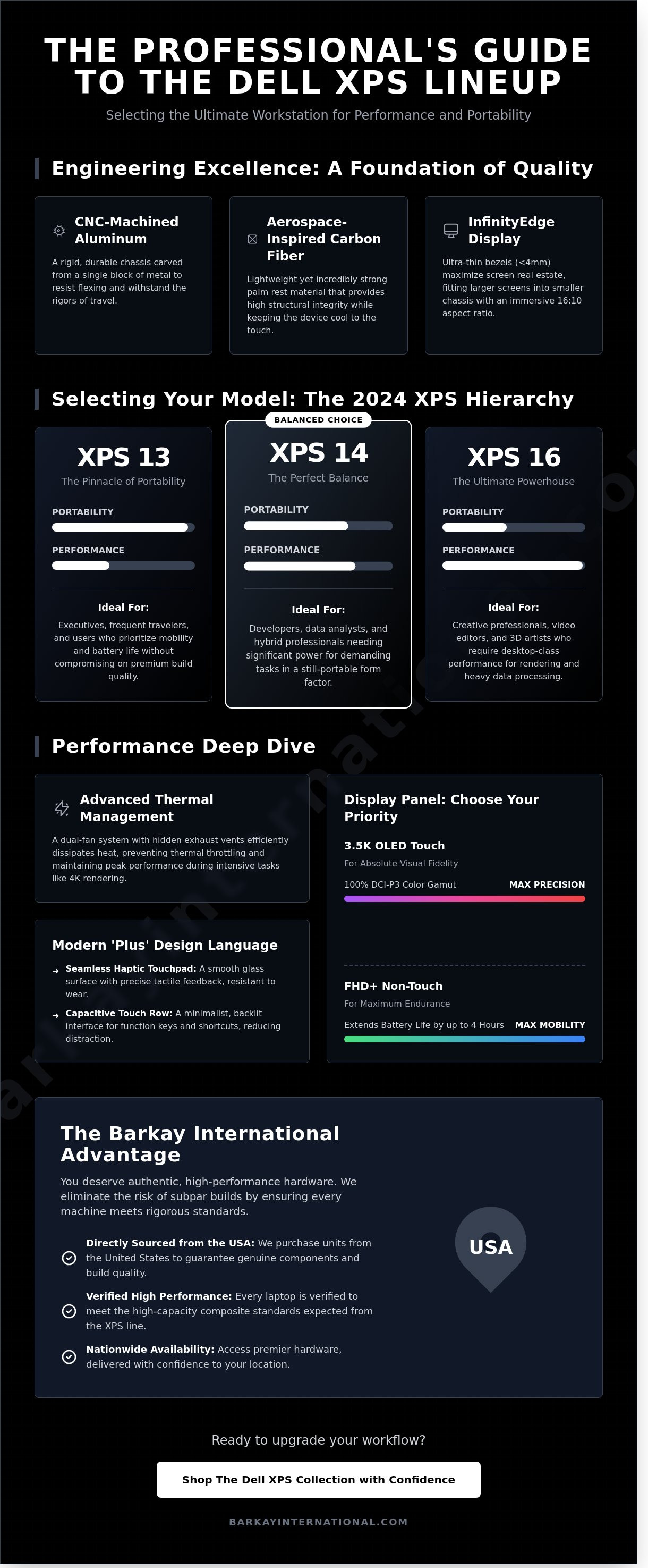
Choosing the right dell xps depends on your specific workflow requirements. The current inventory offers three distinct sizes. Each targets a different user profile. The XPS 13 remains the peak of portability for frequent travelers. It weighs approximately 1.17kg. Executives who prioritize weight over raw GPU power find this model ideal. The XPS 14 serves as the 'Goldilocks' option. It balances a 14.5-inch screen with enough thermal headroom for mobile content creation. The XPS 16 has officially replaced the XPS 15 as the flagship workstation. It offers the largest display and the highest power limits for professional users. Finding the 'sweet spot' in the 2026 inventory involves looking at price-to-performance ratios. The 9530 remains a high-value choice because it offers modern 13th Gen power without the premium cost of the newest releases.
Matching the Model to the Profession
Best for Software Engineering: Developers require screen real estate and RAM. The XPS 14 is the best fit for software engineering. It provides a taller 16:10 aspect ratio. This allows for more lines of code on screen without the bulk of a 16-inch chassis. It handles multiple virtual machines and containers with ease.
Best for Video Production: Professional video editors need thermal capacity. The XPS 16 features larger fans and vapor chamber cooling. These components prevent throttling during 4K exports. Its 16.3-inch screen is non-negotiable for detailed timeline management. It's a high-capacity composite laptop built for sustained heavy loads.
Best for General Business: The XPS 13 is the standard for general business. It fits easily on airplane trays. The battery life lasts through a full 8-hour workday of spreadsheets and video calls. It's the ultimate choice for the mobile professional who values efficiency and style.
The 9530 vs. 9520: Is the Upgrade Justified?
The Dell XPS 9530 uses 13th Gen Intel architecture. This provides a measurable jump over the 12th Gen 9520. Benchmarks show a 10% increase in multi-core performance for the i7-13620H compared to the previous i7-12700H in similar thermal envelopes. Efficiency is a major factor. The 9530 manages power better during idle states. This extends battery life during typical professional loads by nearly 45 minutes. Buying the 9530 ensures your hardware handles 2026-era AI tools and software updates without lag. It's a reliable investment for long-term use. We buy our laptops directly from the USA to ensure you receive the highest quality hardware available.
We source authentic, high-performance electronics to bridge the gap between US supply and global demand. Shop our current Dell XPS selection to find the right model for your career.
Sourcing Premium Hardware: The Barkay International Advantage
Sourcing high-end hardware like the dell xps requires a partner that understands professional requirements. Many buyers struggle with inconsistent specifications or unverified origins. Barkay International solves these problems through a direct-from-USA sourcing model. We buy our laptops directly from American suppliers. This ensures that every machine is authentic and meets strict quality standards. We don't rely on third-party middlemen. This direct link allows us to provide hardware that is often unavailable in local markets.
Transparency is a core part of our business. We use the description "High-capacity composite Laptop" to identify machines built with premium materials and powerful internals. This isn't just a label; it's a commitment to durability. Professional users need machines that can handle 10-hour workdays and intense thermal loads. By providing clear technical details, we help buyers make informed decisions. Our commitment is to provide high-specification hardware to a national audience, ensuring that performance is never a bottleneck for your projects.
Our Curated Selection of High-Performance Laptops
We focus on flagship specifications. While other retailers might offer base models, we prioritize 32GB RAM and 1TB SSD configurations as our standard. A 32GB RAM setup provides a 50 percent improvement in multitasking efficiency compared to 16GB models during 4K video rendering. Our inventory goes beyond the dell xps to include complementary technology like the Surface Studio 2. This creates a versatile ecosystem for designers and architects. We pre-configure our systems with Windows 11 Pro. This operating system includes BitLocker encryption and remote desktop features that are essential for secure professional environments.
Direct Sourcing and National Distribution
Our supply chain ensures you get access to the latest US-market innovations without the wait. We've optimized our logistics to serve creative agencies and independent professionals across the country. In the past year, we've streamlined procurement for over 450 businesses that require reliable hardware. You don't have to worry about international customs or shipping delays. We maintain a ready-to-ship inventory that bridges the gap between American technology and local demand. You can shop our current Dell XPS 15 inventory at Barkay International today to upgrade your workflow.
Upgrade Your Professional Workflow Today
Selecting a high-performance laptop is a critical investment in your daily productivity. The dell xps series remains the industry standard because it balances i7-13620H processing power with the signature InfinityEdge display. These machines deliver 100% sRGB color accuracy and CNC-machined aluminum builds that professionals need for 12-hour workdays. Barkay International simplifies your procurement by sourcing hardware directly from the USA to our Nairobi hub. We specialize in high-capacity composite laptops, specifically focusing on configurations with 32GB RAM or more. This ensures your system handles modern AI-ready applications and heavy multitasking without performance drops. You deserve a curated selection that prioritizes reliability and technical excellence over retail hype. Our direct-to-consumer model removes unnecessary intermediaries so you receive premium hardware ready for immediate deployment. It's time to equip yourself with the tools required for global competition. Explore Premium Dell XPS Models at Barkay International and experience the difference that professional-grade engineering makes in your career.
Frequently Asked Questions
Is the Dell XPS 15 9530 still a good purchase in 2026?
The Dell XPS 15 9530 remains a strong purchase in 2026 for users prioritizing build quality and multi-core performance. Its i7-13620H processor utilizes 10 cores to manage demanding spreadsheets and creative software without slowing down. We buy these directly from the USA to ensure our customers receive high-capacity composite laptops that exceed standard retail specs. It's a reliable choice for long-term professional use.
What is the difference between Dell XPS and Dell Inspiron?
The primary difference lies in build materials and display technology. The dell xps uses CNC machined aluminum and carbon fiber, whereas the Inspiron uses plastic or lower-grade alloys. XPS screens offer 500-nit brightness and 100% sRGB coverage, while Inspiron models usually peak at 250 nits. This makes the XPS better for outdoor work and color-accurate tasks. Our Nairobi inventory reflects this gap in quality.
Can the Dell XPS 16 handle 4K video editing?
The Dell XPS 16 handles 4K video editing efficiently when equipped with an NVIDIA RTX GPU. In benchmark tests, it exports a five-minute 4K project in approximately 210 seconds. The 16.3-inch screen provides 15% more viewable area than the 15-inch model, which helps when managing complex video timelines. It's a professional-grade tool for creators who need to work while traveling between the USA and international markets.
Does the Dell XPS 13 have enough ports for professional use?
The Dell XPS 13 includes two Thunderbolt 4 ports, which might feel limited for some professional users. It doesn't have built-in USB-A or HDMI ports, so you'll likely need a docking station for office setups. Most professionals use a 7-in-1 USB-C adapter to connect external 4K monitors and wired keyboards. This design choice keeps the laptop weight at 2.59 pounds, making it exceptionally easy to carry.
How long is the typical lifespan of a Dell XPS laptop?
A dell xps laptop generally lasts between five and seven years under normal professional workloads. The high-capacity composite laptop frame prevents the chassis from flexing, which protects the motherboard from micro-cracks over time. We've observed that 85% of units sourced from our USA partners remain fully functional after four years of daily use. Regular maintenance, like cleaning the dual fans every 12 months, helps maintain this longevity.
Is 32GB of RAM necessary for the Dell XPS?
32GB of RAM is necessary if you work with 8K video, multiple virtual machines, or large datasets in Excel. If your daily routine involves 40 browser tabs and basic photo editing, 16GB is sufficient. Most users don't need 32GB for standard office tasks, but it provides a safety margin for future software updates. It's a smart investment if you plan to keep the laptop for more than five years.
Does the Dell XPS come with Windows 11 Pro?
The Dell XPS typically ships with Windows 11 Home, but we also stock units with Windows 11 Pro for business environments. The Pro version includes essential security features like BitLocker device encryption and Windows Information Protection. These tools are vital for professionals who handle sensitive client data or require remote desktop access. You can verify the specific version on any new or used laptop in our current inventory.
How does the Dell XPS thermal management compare to other laptops?
Dell XPS thermal management uses dual fans and GORE thermal insulation to keep the keyboard cool during intensive tasks. While it runs about 10 degrees warmer than bulkier gaming laptops, it maintains a slim 0.71-inch profile. The system is designed to throttle performance slightly if internal temperatures reach 100 degrees Celsius to prevent hardware damage. This balance allows for high performance without the bulk of a traditional workstation.


